How to Reserve U.S. Campgrounds the Right Way: Recreation.gov, State Parks, and Passes
If you’re planning your first RV trip in the United States, one question comes up quickly: how do you actually reserve campgrounds RV travelers use across the country?

The short answer: there is no single national booking system. Different public agencies manage different campgrounds, and each may use its own reservation platform.
This guide explains exactly how to reserve campgrounds RV travelers rely on, using official systems like Recreation.gov and National Park Service resources. It’s written especially for first-time international visitors who want a clear, low-stress process.
Why Booking Correctly Matters (Especially for International RV Renters)
In many popular U.S. destinations, campgrounds require advance reservations — especially in national parks, desert regions, and during school holidays.
As an international visitor:
- You likely won’t have backup accommodation.
- You may be driving a larger motorhome than you’re used to.
- You may not want to search for private parks late at night.
Securing official campground reservations in advance removes uncertainty and gives you a confirmed, legal overnight location.
If you’re beginning in southern Arizona, for example, booking ahead is essential when arranging an RV rental in Tucson. Cooler winter months are especially popular in desert parks.
For a broader introduction before you start, read our U.S. campground booking guide.
Step 1: Understand the Main U.S. Campground Booking Systems
There is no single “U.S. campground website.” Instead, you’ll typically use one of these official systems.
Recreation.gov (Federal Lands)
Recreation.gov is the official online reservation platform for many federally managed campgrounds, including sites operated by:
- National Park Service (in many, but not all, parks)
- U.S. Forest Service
- Bureau of Land Management (BLM)
- U.S. Army Corps of Engineers
You create one account and can search nationwide.
Key features for RV travelers:
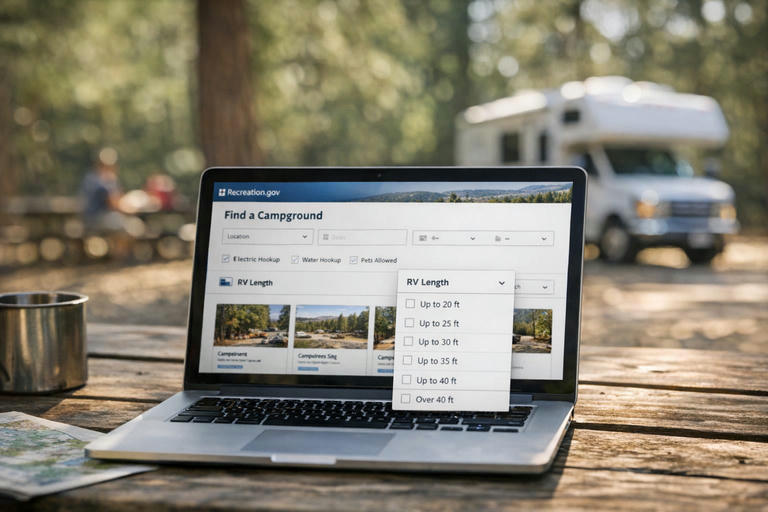
- Filter by equipment type (RV or motorhome).
- Enter maximum RV length.
- View availability calendars.
- Review site photos and layout information (when available).
- Reserve a specific numbered site at many campgrounds.
For most national park and federal recreation camping, this is the system you will use.
National Park Service (NPS.gov)
The National Park Service website provides official park information.
NPS.gov often provides trip-planning details, but the reservation itself may still be processed through Recreation.gov.
Best practice:
- Go to the specific park page on NPS.gov.
- Select “Camping” under the Plan Your Visit section.
- Follow the official reservation link provided there.
This makes sure you are using the correct, official platform.
State Park Reservation Systems
Each U.S. state operates its own park reservation system.
For example, Arizona State Parks uses a separate official state reservation platform — not Recreation.gov.
If you are browsing Arizona RV rentals and planning to visit state parks near Tucson, Phoenix, or Sedona, always book through the official Arizona State Parks website.
General rule: look for official domains ending in .gov or clearly operated by the state park agency.
Step 2: Search the Smart Way (Use RV-Specific Filters)
Not every campsite fits every motorhome.
When searching on Recreation.gov or a state park reservation system:
- Enter your RV length accurately (include rear ladders or fixed storage).
- Select equipment type (motorhome, travel trailer, etc.).
- Check whether the site is back-in or pull-through.
- Confirm whether it has electric only, electric and water, or no hookups (dry camping).
Always compare your confirmed RV rental specifications with the campground’s listed maximum vehicle length.
Step 3: Understand Entrance Fees vs. Campground Fees
Many first-time visitors assume that a campsite reservation includes national park entry. That is not always correct.
In many National Park Service sites, there are two separate charges:
- Park entrance fee (per vehicle).
- Campground reservation fee.
A campground reservation confirms your overnight space. It may not include entry into the park unless the park specifically states that it does.
Always check the official fee details on the park’s NPS.gov page.
Park Passes: What They Cover (and What They Don’t)
The National Park Service participates in the America the Beautiful Interagency Pass Program.
These passes may cover entrance fees at many federal recreation sites, including national parks and other participating agencies.
They do not automatically cover campground reservation fees.
Before purchasing a pass, confirm current pricing, eligibility, and coverage directly on NPS.gov.
Booking Windows: How Early Should You Reserve?
Reservation windows vary by campground.
Many federal campgrounds release sites on a rolling basis (for example, up to six months in advance). Others may open bookings for an entire season at once.
High-demand situations include:
- National parks during summer.
- Desert regions in winter.
- School holidays and long weekends.
- Fee-free days designated by the National Park Service.
The National Park Service announces official fee-free days on NPS.gov. On these dates, park entrance fees are waived at participating sites, but campground reservation fees generally still apply.
If your travel dates are fixed due to international flights, set a reminder and reserve as early as the booking window allows.
Dry Camping vs. Hookups: What First-Timers Should Choose
On Recreation.gov and many state systems, you will see different utility types.
Dry camping (no hookups) means:
- You rely on your onboard freshwater tank.
- You use internal waste tanks.
- Generator use is subject to campground quiet-hour rules.
Sites with electric and water hookups are usually easier for first-time international renters. If you are new to RV systems, prioritize at least electric service.
Can You Camp Without a Reservation?
Some public lands offer first-come, first-served sites.
However:
- Availability is not guaranteed.
- Arrival time matters.
- Popular parks often fill early.
For your first nights after collecting your RV — especially in unfamiliar regions — an advance reservation is strongly recommended.
Practical Booking Checklist for International RV Travelers
Before confirming any campground:
- Confirm the maximum RV length allowed.
- Confirm the hookup type.
- Check check-in and check-out times.
- Review the official cancellation policy.
- Confirm payment requirements.
- Save or screenshot your reservation confirmation.
- Note any gate codes or after-hours arrival procedures.
Mobile service can be limited inside national parks, so keep offline copies.
Frequently Asked Questions About Reserving U.S. Campgrounds
Can I change or modify a reservation on Recreation.gov?
Can I change or modify a reservation on Recreation.gov?
In many cases, yes. Recreation.gov allows users to log into their account to modify dates or site selections if availability exists. Modification fees or new rate differences may apply. Always review the specific campground’s change policy before confirming.
What is the typical cancellation policy?
What is the typical cancellation policy?
Cancellation policies vary by campground and managing agency. Recreation.gov listings include a clearly posted cancellation policy for each site. Some charge a flat cancellation fee; others may deduct a percentage depending on how many days before arrival you cancel. Always read the policy on the official listing page before booking.
Are campsite photos on Recreation.gov accurate?
Are campsite photos on Recreation.gov accurate?
Photos shown on Recreation.gov help you understand the layout and terrain, but site conditions can change over time. Use photos as guidance, and always check the listed dimensions, surface type, and RV length limits in the written site description.
What payment methods are required for international visitors?
What payment methods are required for international visitors?
Recreation.gov and most state park systems require advance payment at the time of booking, typically by major credit or debit card. Make sure your card is enabled for international transactions. Carry identification that matches the reservation name in case campground hosts request confirmation.
Do I need a printed reservation confirmation?
Do I need a printed reservation confirmation?
Many campgrounds accept digital confirmations, but printed copies can be helpful in low-signal areas. Check arrival instructions in your confirmation email for specific requirements.
Putting It All Together
Booking U.S. campgrounds the right way is about using official systems and understanding how they work:
- Use Recreation.gov for many federal campgrounds.
- Use NPS.gov to confirm official park rules and fee information.
- Use official state park websites for state-managed campgrounds.
- Book early for high-demand seasons and holidays.
- Carefully verify RV size and hookup details.
If you’re planning a desert adventure, starting with an RV rental in Tucson provides access to a wide range of federal and state camping options. Exploring broader Arizona RV rentals can also help you match the right vehicle to the type of campground you plan to reserve.
Reserve correctly. Drive confidently. Enjoy the journey.
Ready to compare USA RV rentals?
Use the compact search below to check live availability, compare motorhome options, and start shaping your route.